
Coreworx-Logo-Positive

Interface Connect

Interface management software that
keeps delivery teams aligned

Interface Management Software


    Proarc-Logo-Positive

    Document Control

    Engineering document management
    system (EDMS) and document control software

    Document Management Software


      mpower-Logo-Positive

      Project Controls

      Project control and cost management software that provides complete control of project costs and drives better performance  

      Project Controls & Cost Management Software


        ProPeople-Logo-Positive

        Crew Management 

        Crew management software that helps organizations ensure crews are scheduled efficiently based on skills, competencies, and availability.

        Crew Management Software


          Background Image
          Blog

          Proarc 7.5 FP3, Plus Teams Co-editing & Fileshare Outbound Sneak Peek

          We’re excited to announce Proarc 7.5 Feature Pack 3 (FP3), which will deliver practical improvements across document management, planning, and product support. It also marks a meaningful step forward in how teams will engage with Proarc to find, manage, and collaborate on project documents. 

          Alongside FP3, we’re announcing two new powerful, optional add-ons: Proarc Fileshare Outbound and Proarc Co-Editing. These add-ons will streamline how project team members and stakeholders collaborate on documents while keeping documents in your controlled system. 

          New Optional Add-Ons


          • Proarc File Co‑Editing Add-On

          Edit in Microsoft Teams; govern in Proarc.

          With Proarc File Co‑Editing, projects can allow team members to edit and collaborate on Microsoft Office documents via Microsoft Teams while they are continually controlled and governed in your official Proarc EDMS.

          Proarc File Co-editing connects Proarc EDMS with Microsoft Teams so contributors can use familiar Word, Excel, and PowerPoint tools (including track changes and comments) while Proarc permissions and your Microsoft Entra policies govern who can participate and what they can do.

          When a session ends, every change is captured back to the official Proarc record with revision and file history, and the co‑editing step can be embedded in any Proarc workflow to support your processes and standards.

          Separate, session‑specific workspaces, chat links, and a complete audit trail keep collaboration organized and defensible—and because files are shared from (and remain linked to) Proarc, everyone is aligned to a single source of truth.

          This results in an intuitive co-editing user experience in Microsoft paired with a full lifecycle history of decisions and edits. 


          • Proarc Fileshare Outbound Add-On 

          Controlled external distribution for compliant, up-to-date project documents.  

          Proarc Fileshare Outbound streamlines external distribution of large files and transmittals by issuing secure download links directly from official Proarc document revisions; avoiding the risks, size limits, and lack of proof that sending copies of files using email introduces.

          From within a Proarc workflow, authorised users create a share area, send recipient‑specific encrypted links, and let Proarc record distribution and download events (who accessed what, and when) for audit and non‑repudiation.

          Access secure document revisions via transmittals in Proarc Fileshare Outbound

          Access secure document revisions via transmittal in Proarc Fileshare Outbound

          Access respects Proarc permissions and your Microsoft Entra authentication policies, with options such as link expiry and automatic deletion of shared data—plus tracking and resend controls for administrators.

          This removes manual compress‑upload‑track steps across external portals, protects confidential designs and IP by avoiding uncontrolled copies, and makes it straightforward for vendors and partners to retrieve exactly the right package.

          You can also tailor workflow steps, email templates, and branding to meet client expectations and contractual requirements; all while keeping a complete audit history in Proarc. 

          Note: Add-ons are optional and are not activated with your Proarc FP3 upgrade without an additional subscription. 


          Proarc 7.5 FP3 Updates  

          Proarc 7.5 Feature Pack 3 will deliver practical improvements across document management, planning, and product support, and also achieve an initial milestone for an improved user experience.  

          Highlights of the Proarc 7.5 FP3 upgrade include the following:


          • Proarc Modern UI Foundations 

          Introducing phase one of Modern UI foundations: a fast, reliable web UI core that will unlock a wave of new UI enhancements in upcoming releases. 

          Proarc 7.5 FP3 includes the Modern UI base framework and design system for the new web experience, as well as the foundation of global search. 

          Users will get early access to the new core to see the direction of the web experience and prepare for upcoming features. This foundational work lets us deliver new capabilities faster in future releases.

          Modern UI is guided by three principles:

          1. Reliability and performance: a streamlined front end that feels faster and stays responsive under load.

          2. Consistency and clarity: a cohesive design system for clear, predictable interactions across modules.

          3. Accessibility by default: inclusive patterns that reduce friction and help every user move quickly and confidently 

          As Modern UI progresses, you can expect steady additions on top of this core, including a cleaner interface, faster navigation, and more intuitive workflows that reduce clicks and cognitive load. 

          See a snippet of the new Proarc AI search experience via Proarc’s new Modern UI: 


          • ProView Updates (Add-on)

          ProView PDF File Merge  

          You can now merge several PDF files on a revision into a single PDF. Use PDF merge templates to define merge behaviour and defaults, pre‑select files based on attributes, or control which templates are available for specific documents. 
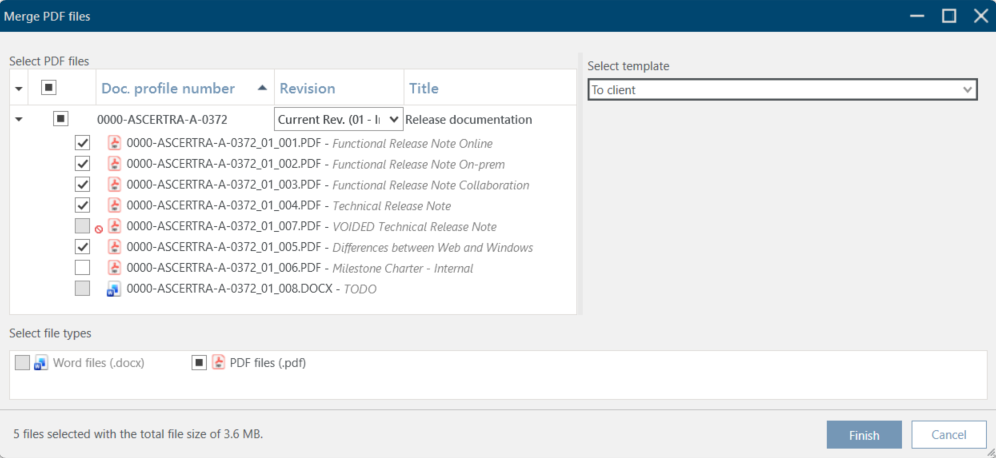
          ProView PDF File Merge allows you to combine several individual PDF files into a single PDF

          File selection window for PDF File Merge

           
          Templates  

          Templates are used to preselect which files to merge and which elements should be included in the merged file, such as annotations, attachments, and bookmarks.

          • Template Keys
            Template keys determine which templates appear in the Select Files dialog. Use them to surface the right templates based on a document’s attributes (for example, Project or Client). 

          • Automatic File Selection
            When you choose a template in Select Files, the files to be merged can be auto‑selected using text‑based file attribute filters defined in the template. For example: set a filter such as ForClient=True to automatically select all PDFs marked for the client.  


          ProView File Viewer

          ProView now supports opening attachments of PDF files with the following limits:  

          1. Individual attachment sizes up to 100 MB,
          2. The total of all attachments plus the PDF file is less than 2 GB.  

          This extends ProView’s usefulness when PDFs include embedded reference material. 


          • Proarc Planning Updates (Add-On)

          Reforecast Function

          If you manage forecast dates manually, you can quickly recalculate forecast dates using Reforecast.

          A new setting is introduced for forecast calculations. If the setting CalculateForecastDatesBasedOnChain=true, the Forecast dates will be calculated based on the chain’s interval between the milestones. If false, the existing dates will be used, adjusted for the deviation between the Actual Date and the existing Forecast Date for the achieved milestone.  

          Forecast Deviation Identification

          See colour‑coded deviations to understand how forecast dates align with milestone intervals (available only when milestone duration = Days). The colors used for the deviations can be defined using a new setting: ForecastColorRules. 

          Choose from two methods:

          • Cumulative Deviation (From first/selected milestone): compares forecast dates to the first or selected milestone using cumulative chain intervals. Helpful for assessing the overall chain.

          • Step by Step Deviation (From previous milestone): compares each forecast date to the preceding milestone. Helpful for pinpointing where deviations occur.
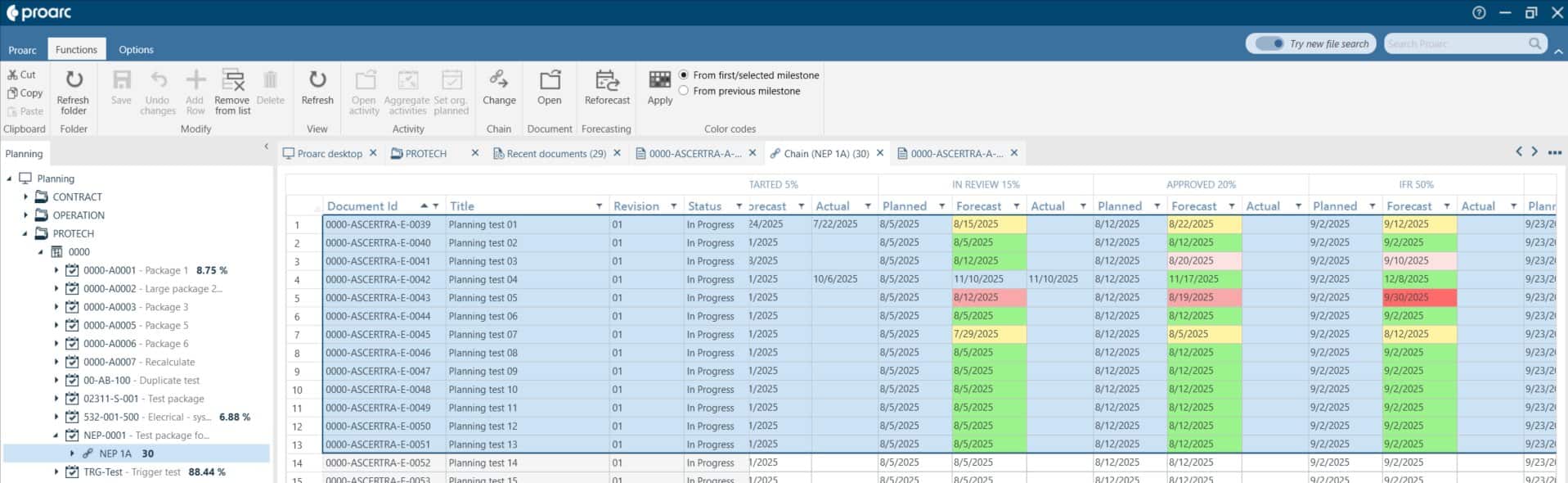
          Proarc Planning features color-coding for forecast dates in Proarc 7.5 FP3

          Above: Colour coding for Forecast dates in Proarc EDMS 7.5 FP3


          Primavera P6 Additional Data

          A new set of columns is added to the activity list to show original baseline dates from the planning tool, e.g. Primavera P6. The columns are enabled using the setting ShowBaselineFields=true.

          • If set to True, three columns for baseline dates (BL Start, BL Finish, BL Late Finish) appear for activities in the Planning module.

          • Data in these cells must be updated using the API or imported from Primavera P6 using the Proarc to P6 integration.


          • Help Center Search Functionality

          The Help Center now returns more relevant results by applying an implied AND between search terms. 


          Learn More About Proarc 7.5 Feature Pack 3 & New Add-Ons

          Proarc 7.5 Feature Pack 3 will deliver practical upgrades across document management, planning, and product support, and mark a meaningful step forward in how teams find, manage, and collaborate on project documents. Alongside FP3, optional add-ons including Proarc Fileshare Outbound and Proarc Co-Editing will help streamline collaboration for project teams and stakeholders while keeping documents inside your controlled system.

          Watch for more information on Proarc FP3 and our two new add-ons here on the Ascertra blog and check out the Proarc product page for more information on how our document control solution can help your projects. 



          Ready to make reliable information the center
          of your projects and operations to minimize
          risk and deliver quality results every time?
          Speak to one of our experts to choose the solution that will help you
          achieve your business goals
          Request a Demo