




Proarc Fileshare Outbound* is an add-on that enables project teams to securely distribute documents from Proarc Engineering Document Management Software to external recipients through an online download location. It's designed for issuing transmittals with large files or document packages containing many files. Every distribution and download event is recorded, including recipient and date information, giving teams a detailed audit trail.
Document distribution has a significant impact on the execution of engineering and construction projects. Thousands of documents need to move between internal teams and external stakeholders, often under strict contractual and compliance requirements. When these exchanges rely on email attachments or generic file-sharing tools, project teams can face operational challenges, safety risks, and costly delays.
Jump to- What are the benefits of Proarc Fileshare Outbound?
- How does Proarc Fileshare Outbound improve distribution efficiency?
- How does Proarc Fileshare Outbound protect shared documents?
- How does controlled document sharing reduce project risk?
- What does this mean for project teams?
- Video: Intro to Fileshare Outbound
- More information
- Proarc Fileshare Outbound FAQs
What are the benefits of Proarc Fileshare Outbound?
Proarc Fileshare Outbound helps organisations distribute project documents efficiently while maintaining control over external access. By managing the process within Proarc, teams can reduce manual administration, protect sensitive information, and retain a traceable record of document exchanges.
These capabilities address an important requirement in engineering and capital project delivery. Teams regularly share document packages with contractors, suppliers, clients, and project partners, and each exchange must be accurate, secure, and traceable. Processes that depend on email attachments, shared drives, or manually managed file-sharing tools can make distribution harder to administer and monitor.
How does Proarc Fileshare Outbound support distribution efficiency?
Project teams should be able to focus on project delivery rather than spend hours preparing document packages and coordinating their distribution.
Proarc Fileshare Outbound allows organisations to create preconfigured distribution lists containing selected documents and recipient groups. For recurring distributions, users can initiate the process from an existing configuration instead of repeatedly searching for the same documents or rebuilding recipient lists. This creates a consistent workflow and reduces repetitive administrative work.
The solution also handles several stages of the distribution process automatically. It generates the transmittal, compresses the relevant files, creates a secure download area, and sends notifications to recipients. As a result, a sequence that would otherwise involve several manual steps becomes a repeatable workflow managed within Proarc.
Distribution activity is administered and tracked from the same location, giving teams a clearer view of each document exchange. There is less need to piece together information from spreadsheets, email chains, and separate tracking systems.
External recipients enjoy an easy and efficient download experience, requiring no training from the project team. A personalised email link takes them directly to the transmittal package for a single-click download operation.
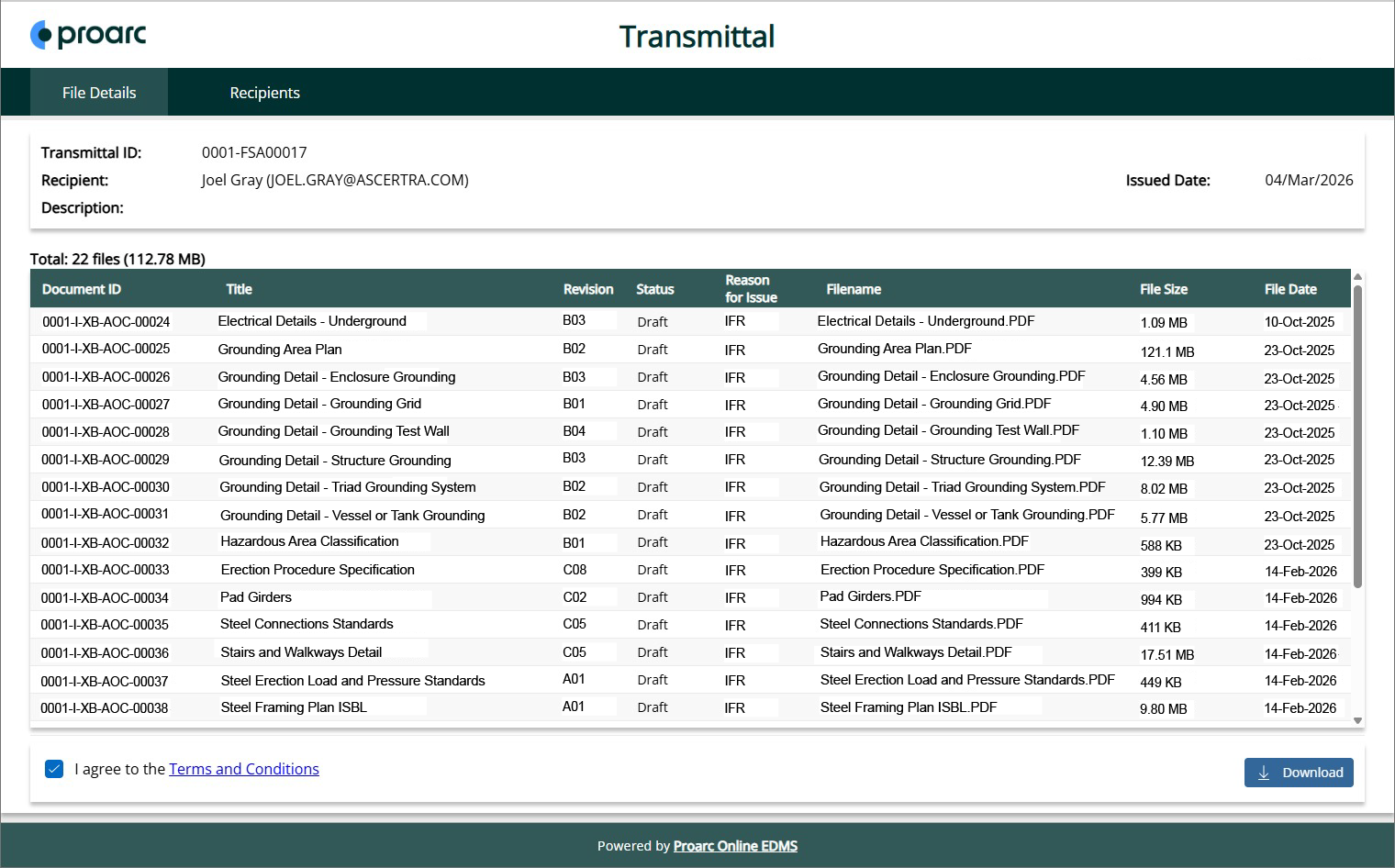
Proarc Fileshare Outbound auto-generates transmittals and download areas for external recipients
How does Proarc Fileshare Outbound protect shared documents?
Engineering documentation can contain sensitive project, operational, or commercial information. When files are distributed through manual processes, controlling access can become more difficult.
Proarc Fileshare Outbound generates a unique encrypted link for each recipient. Organisations can also configure an expiration date, limiting how long the documents remain available and reducing the risk of access after the intended distribution period.
External recipients are required to authenticate through Microsoft Entra ID and its associated identity policies to ensure only invited individuals gain access to the transmittal and shared files.
Automated cleanup schedules remove distributed files after a specified period, rather than leaving document copies available indefinitely. Time-limited availability reduces the likelihood of older versions remaining in circulation and encourages recipients to return to the controlled distribution source.
How does controlled document sharing reduce project risk?
Project teams need confidence that external stakeholders can access the correct information. When documents are emailed or copied outside the electronic document management system, organisations may lose visibility over where those copies are stored and who has accessed them. It can also become more difficult to determine whether recipients are referring to the latest revisions.
Contracting parties using outdated or mismatched document revisions for construction, testing, or operations greatly increase the probability of error, rework, and safety incidents. The impacts can be massive to project schedule, cost, and most importantly, human lives.
Proarc Fileshare Outbound keeps the distribution process connected to Proarc and the authoritative documents and revisions, so you can be assured that everyone is working with officially approved information.
The solution also maintains a detailed audit log of distribution and download activity. Download receipts and activity histories record information such as document deliveries, recipient interactions, and relevant dates. Together, these records provide traceability for project governance, contractual compliance, and dispute resolution when required.
What does this mean for project teams?
Proarc Fileshare Outbound turns document distribution into a controlled workflow managed within Proarc EDMS. Automation reduces the effort required to prepare and issue document packages, while recipient-specific access controls help protect shared information.
At the same time, audit logging gives teams a verifiable record of each exchange. Organisations can distribute project information efficiently without losing visibility over how documents are shared, accessed, and managed.
The result is a more consistent document exchange process, stronger information governance, and greater confidence that stakeholders are accessing the intended project information.
Video: Intro to Fileshare Outbound
See a quick intro of Proarc Fileshare Outbound.
More information on Fileshare Outbound
Download the Fileshare Outbound datasheet to learn how it can help your project team ensure secure, external distribution of critical project documents.
