
Coreworx Interface Connect 4.5 introduces automated, configurable risk indicators in the interface register, with clear color coding to surface issues earlier. It also provides easier access to previous interface point revisions.
In addition, the release expands search capabilities across dependent attributes and string fields. This post explores how these enhancements strengthen Coreworx Interface Management Software's risk identification, streamline collaboration, and improve delivery, with a look at the rules, benefits, and how to see them in action.
Contents:
- What's New in Coreworx 4.5
- How Do Automated Risk Indicators Help My Team?
- Additional Enhancements in Coreworx 4.5
- New to Coreworx Interface Connect?
- Summary: Coreworx 4.5
- Coreworx 4.5 FAQs
What’s New in Coreworx 4.5
Coreworx now provides configurable risk indicators directly within the interface register. Visual indicators of risk automatically highlight potential problem areas, enabling quick identification of at-risk interfaces. Project teams choose the risk indicators that make sense for their project. Color coding and icons, based on configurable rules, identifies the level of risk each interface represents.
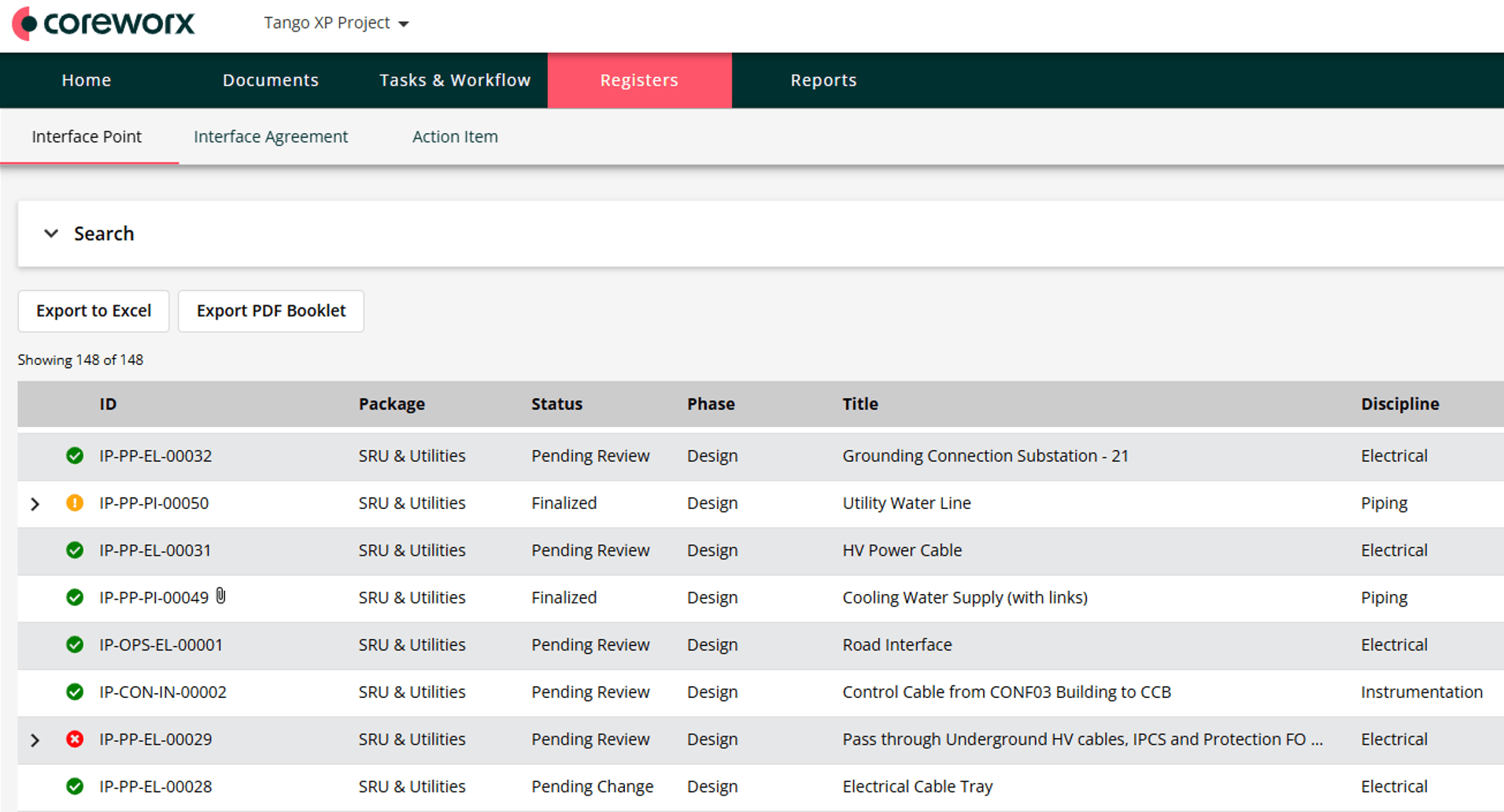
Figure 1: Real-time visual indicators bring instant visibility of interface-related risk to users
Configurable rules include:
- Number of overdue interface agreements
- Number of overdue action items
- Interface points with zero interface agreements
- Interface points with schedule misalignment
By continuously analysing interface data, the system identifies risks early, helping teams address these issues before they escalate. This automation applies consistent risk assessment across all interfaces, saving interface managers considerable time that would otherwise be spent on manual analysis.
How Do Automated Risk Indicators Help My Team?
Visual risk indicators within the interface register highlight potential issues early by automatically applying consistent, system-defined rules across all interfaces. This enables delivery teams to apply risk rules that proactively prevent interface points from becoming high risk.
By removing the need for manual analysis, these visual cues save significant time and help reduce the chance of overlooked risks—enabling interface managers to prioritize actions, improve coordination, and proactively mitigate issues.
Other benefits include:
- Better collaboration and transparency
- Centralized risk information visible to all stakeholders
- Improved project delivery outcomes and fewer surprises
- Cost reduction by avoiding rework, delays, or budget overruns through early detection
- Improved decision‑making as interface managers can prioritize and allocate resources based on clearly displayed risk
Additional Enhancements in Coreworx 4.5
Access to previous revisions of interface points
You can now view previous revisions of an interface point. A new revision is created each time an interface point is updated. The new Revisions tab provides access to PDF copies of all prior revisions.
Improved search
Search now supports dependent attributes and string fields.
New to Coreworx Interface Connect?
Coreworx Interface Connect is a cloud-based collaboration platform built to support comprehensive interface management for major capital projects. It enables early identification of interface risk that can impact project cost or schedule.
By ensuring formal scope delineation and alignment, Coreworx helps prevent scope gaps, overlaps, and integration issues that commonly arise when interfaces are not managed effectively. This early visibility reduces rework, minimizes delays, and improves overall project predictability.
The platform mitigates risk by establishing structured communication, collaboration, and data‑sharing practices across all participants so technical data is exchanged consistently, efficiently, and on schedule.
Modern projects are complex. Global execution models, distributed teams, varying time zones, multicultural environments, and multi‑year durations create coordination challenges. Coreworx provides tools that simplify coordination and improve insight to reduce risk.
Summary: Coreworx 4.5
Coreworx Interface Risk Identification gives you real‑time visibility into potential interface issues. Configurable rules and visual indicators surface problems early, so you can act before they affect cost or schedule. Upgrade to Interface Connect 4.5 to enable automated risk indicators, access previous interface point revisions in the Revisions tab, and use improved search across dependent attributes and string fields.
New to Coreworx Interface Management Software? Download the Coreworx Interface Connect brochure to see how interface identification works in practice, then contact our team when you are ready to discuss your project.