

We're excited to preview the release of Proarc 7.6, which has been designed to help users find information faster, work more efficiently with search results, simplify planning activities, and streamline everyday document management tasks within Proarc Document Management Engineering software.
Proarc 7.6 marks an important milestone in the product’s evolution, as it will be the final release available for on-premises installations. Please note: the Modern UI capabilities highlighted below will only be available in the Proarc Online version and will not be supported in on-premises environments.
Jump to
- Modern UI search
- Reduce repetitive work in project planning
- Remember preferred download locations
- Strengthen performance and the Proarc platform
- An important release for on-premises customers
- See Proarc 7.6 in action
- Proarc 7.6 FAQs
Modern UI Search: turn search results into a more productive workspace
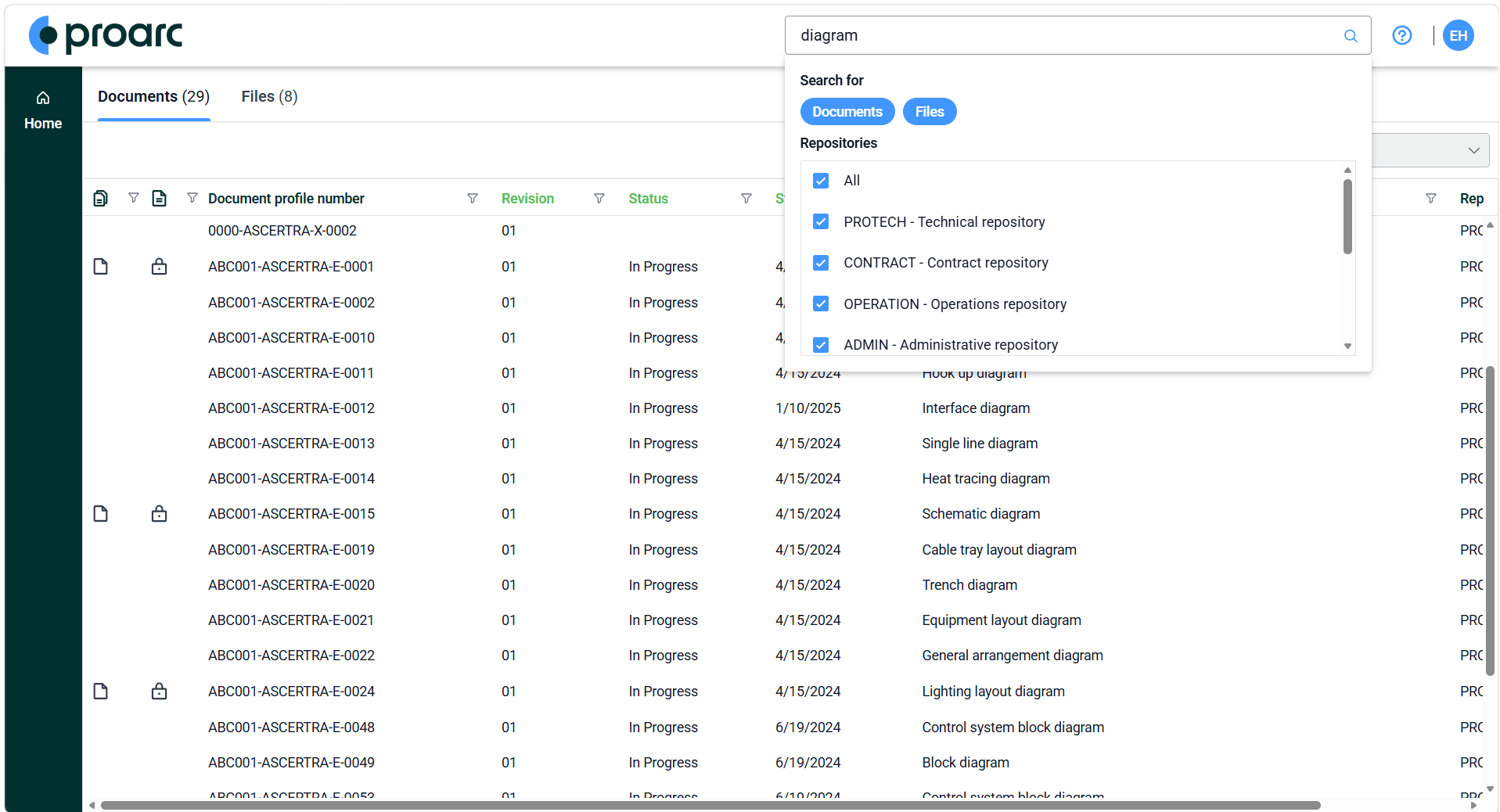
Figure 1: Modern UI Search in Proarc 7.6 helps users find the information they need in a more intuitive way
Note: not available for Proarc on-premises implementations
Search is rarely the end of a task. Document controllers may need to review revision and workflow information. Engineers might focus on supplier references or technical attributes. Project managers may require planning data, while administrators need consistent views that support established business processes.
Proarc 7.6 expands the Modern UI Search experience to give each user a more effective way to work with the information they find.
Switch between result list views
Different tasks require different perspectives on the same document set. Result list view switching will allow users to move between predefined layouts directly from their search results.
Depending on the views available to them, users will be able to select:
- Default views
- Shared views maintained by administrators
- Personal My Views
When a view is selected, Proarc automatically applies its configured columns, column order, widths, and layout settings.
A document controller could switch to a view focused on revision and workflow details, then move to another layout designed for project reporting; an engineer could prioritize technical attributes without manually rebuilding the result list each time.
This flexibility supports individual working preferences while helping organizations maintain standardized views for shared processes.
Configure results around the task at hand
Users will also have more control over how information appears in the result list, including the ability to:
- Sort columns
- Filter columns
- Resize columns
- Reorder columns
These options can make large result sets easier to review. Instead of working through unnecessary information, users can bring the most relevant details to the forefront and organize results around the immediate task.
Export search results to Excel
Proarc 7.6 will also introduce the ability to export document search results to Microsoft Excel.
This gives users a straightforward way to take Proarc document information into familiar reporting and analysis workflows, including:
- Project reporting
- Information verification
- Ad hoc analysis
- Stakeholder communication
- Progress reviews
Together with view switching, filtering, result selection, and clipboard copying, Excel export extends Modern UI Search beyond information retrieval. Search results become a practical workspace for reviewing, organizing, and communicating document information.
Reduce repetitive work in project planning
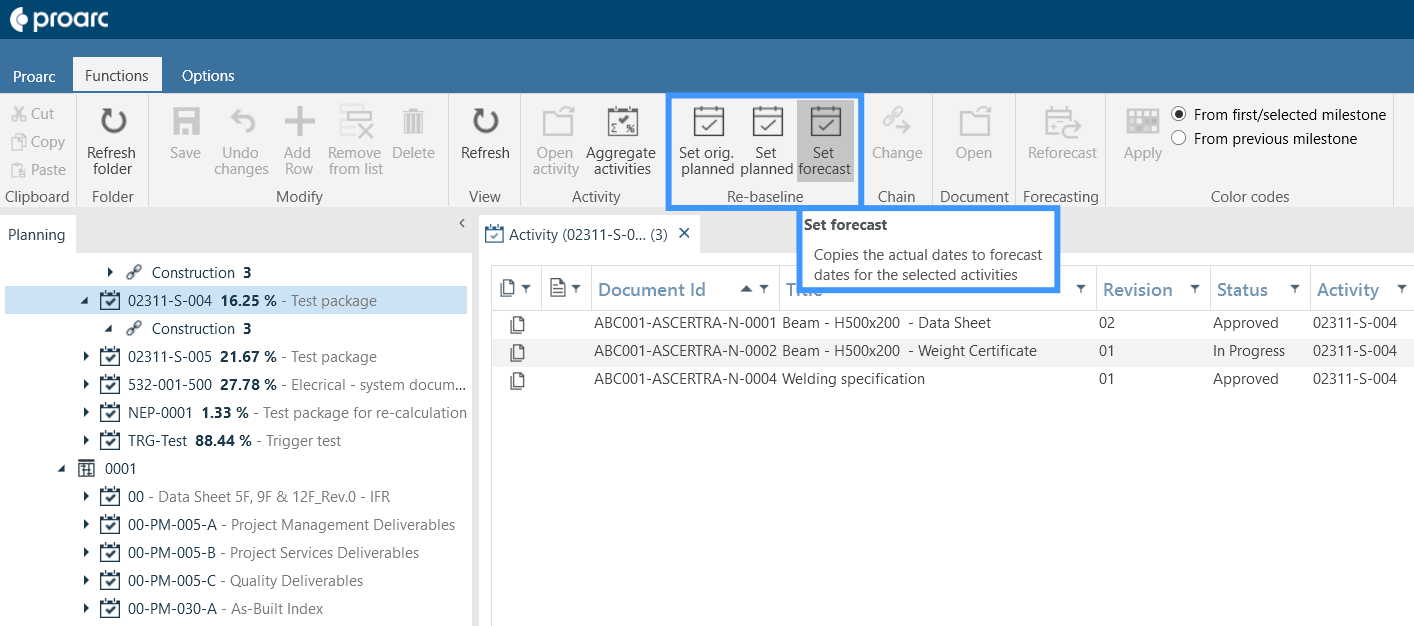
Figure 2: Proarc planning's re-baselining function reduces repetitive data entry for schedule updates
Planning information changes throughout the project lifecycle; forecasts develop, actual values are recorded, and planned dates or figures need to be updated as work progresses.
Proarc 7.6 introduces dedicated actions for copying information between:
- Actual values
- Forecast values
- Planned values
By reducing repetitive data entry, these actions can help planning teams update schedules more efficiently and maintain greater consistency across planning information.
The result is a simpler approach to routine schedule maintenance, giving teams more time to concentrate on project execution, forecasting, progress monitoring, and reporting.
Remember preferred download locations
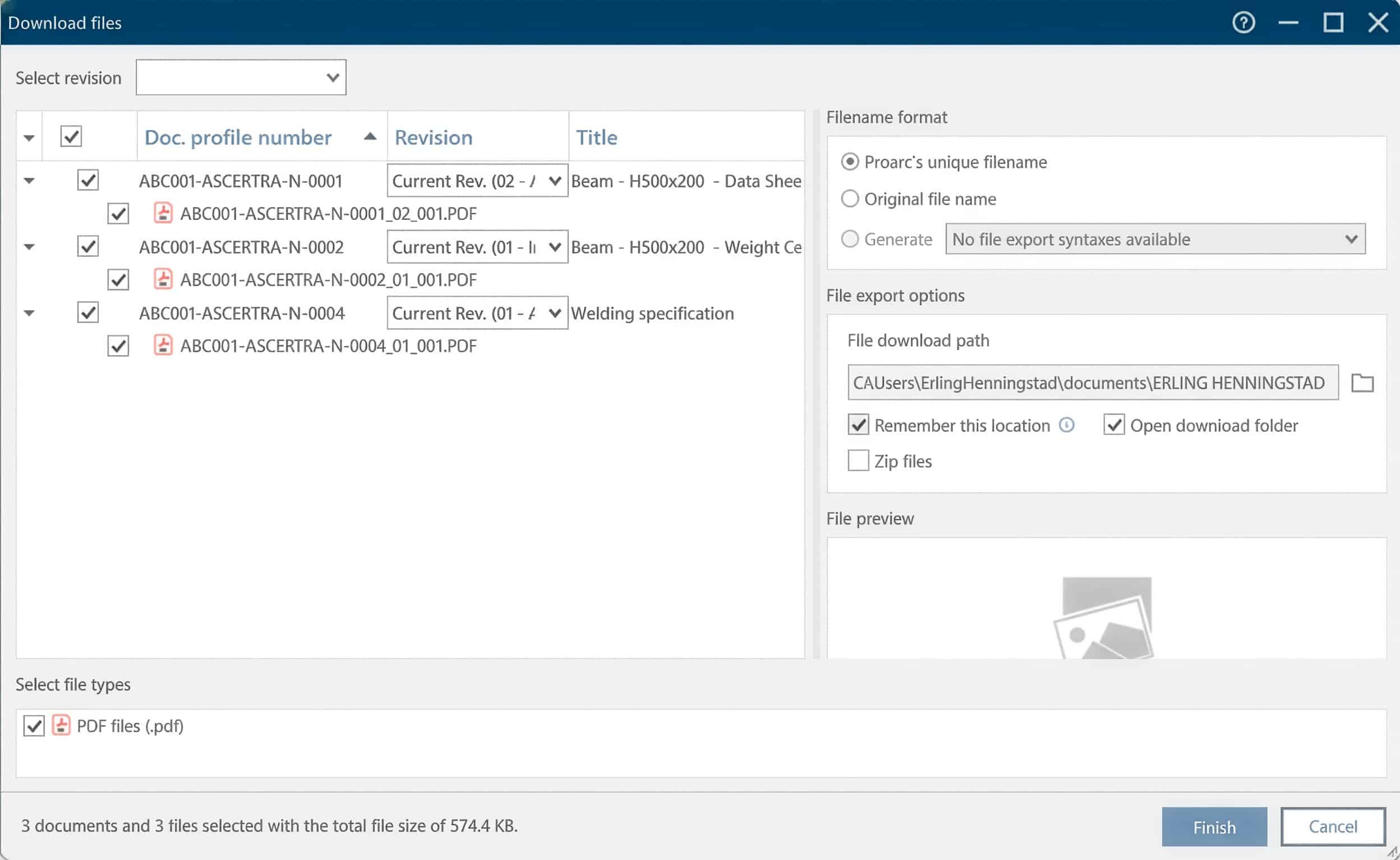
Figure 3: Proarc 7.6 allows users to remember preferred download locations between sessions
Users will be able to retain their preferred download location between sessions.
For teams that regularly save documents to the same project directory, engineering workspace, or dedicated working folder, this removes the need to navigate back to that location for every download.
Choose whether downloaded folders open automatically
A new user preference will also control whether the destination folder opens automatically after files have been downloaded.
Users who want immediate access to downloaded files can keep the folder-opening behavior enabled. Those who frequently download files and prefer fewer interruptions can turn it off.
The preference will be remembered across sessions and can be managed through user settings and download dialogs.
Strengthen performance and the Proarc platform
Alongside its user-facing enhancements, Proarc 7.6 includes investments in performance, platform stability, maintainability, compatibility, and security.
Organizations working with large access-control datasets can expect improved filtering performance within Logon Key administration. This is intended to improve responsiveness and help administrators manage extensive security configurations more efficiently.
The release also includes upgrades to third-party components across application services, APIs, desktop and web applications, search services, security components, and supporting infrastructure. These modernization activities support the long-term sustainability of the Proarc platform and provide a stronger technical foundation for future innovation.
An important release for on-premises customers
Proarc 7.6 will be the last Proarc update made available to on-premises implementations.
The release will deliver improvements across planning, file management, administration, performance, and the wider platform. However, the Modern UI Search enhancements described in this preview, including result list view switching, result configuration, and Excel export, will be available only to Proarc Online customers.
See Proarc 7.6 in action
Join our upcoming sneak peek webinar to explore the new capabilities and see how Proarc 7.6 can support faster information access, more efficient planning, and smoother document management workflows.